Over the last 2 weeks, I’ve mainly been working on a way to convert a 3D model’s vertices into a 2D texture so that I can create a JitterTable, or a 2D texture containing seed points. It was quite difficult for me to do this, as I didn’t know exactly where to start.
The goal of this is to create bins that each point might fall into, so that you can select a single seed point to work from.
My first idea was to use a 3D texture to store X, Y, and Z data in bins of equal size. This seemed to be the most difficult path – it’s quite easy to make a few computationally expensive loops to fill in missing data in the texture, but the processing speed is incredibly slow.
In this case, a 2D texture seemed to be a better option. This is where I spent the majority of my time. I started with the model’s vertex data (approximately 1900 points), and followed the following steps:
- Remove duplicate vertices
- Bring the data to a more usable size – the value of each vertex was usually around the scale of 0.0001 (why?), which would be difficult to work with when assigning values into a int-based array of pixels.
- Ensure that all data is mapped from 0 -> 100, so that there are no negative values (which could cause wrapping)
- Keep only values with unique X & Y coordinates. There were approximately 300 – 500 points after this.
- Keep every 10th point to spread out the data – for a single level, we don’t want tons of points. While this method doesn’t position the points at equal distances, it does concentrate data in areas with greater variation.
- Create colours for each point based on their vertex data, and input it into a texture.
These steps left me with the following images, ordered from most to least points (left to right):
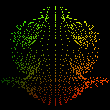
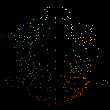
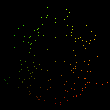
It’s not very bin-like.
My next step was to consider how to fill in the rest of the data – a bunch of individual points won’t give the results that we want in the shader.
I had 2 ideas for this, and I’ve implemented the first one (at least the texture setup – I’m still working on the second), since it seemed easier to me in the moment.
- Bloom each pixel to create more natural colour blocks.
Pros: the pixels will be concentrated in more organic areas
Cons: that’s still not a standard bin, is it? - Create bins of equal size (say, 5×5 or 10×10) and take the colour of the first (or middle) pixel found within that bin.
Pros: this makes real bins
Cons: might not look as natural
Here’s an image of what the first method looks like as a texture.
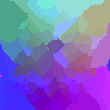
The reason that I chose to try blooming the data first was to try to fill in data where there might not be any to begin with. This seemed like a good idea at the time, but perhaps the better solution would be, in the standard bin method, to copy nearby blocks into empty ones so that there are no “empty” pixels.
Perhaps another method that might be better would be to create a 2D Texture or a vector array, in which we perform a calculation in the shader to determine which bin belongs to which pixel might belong to which bin. I haven’t figured out a great way to do this, though.
 StyleBlit: Image Stylization Project